Keep Score
Cricket, 301 and 501, against friends, bots or ghosts.
- STEP 1Pick A Game
Tap Keep Score, then choose Cricket, 301 or 501.
- STEP 2Add Players
Up to four. A name is enough. Nobody needs an account.
- STEP 3Tap What You Hit
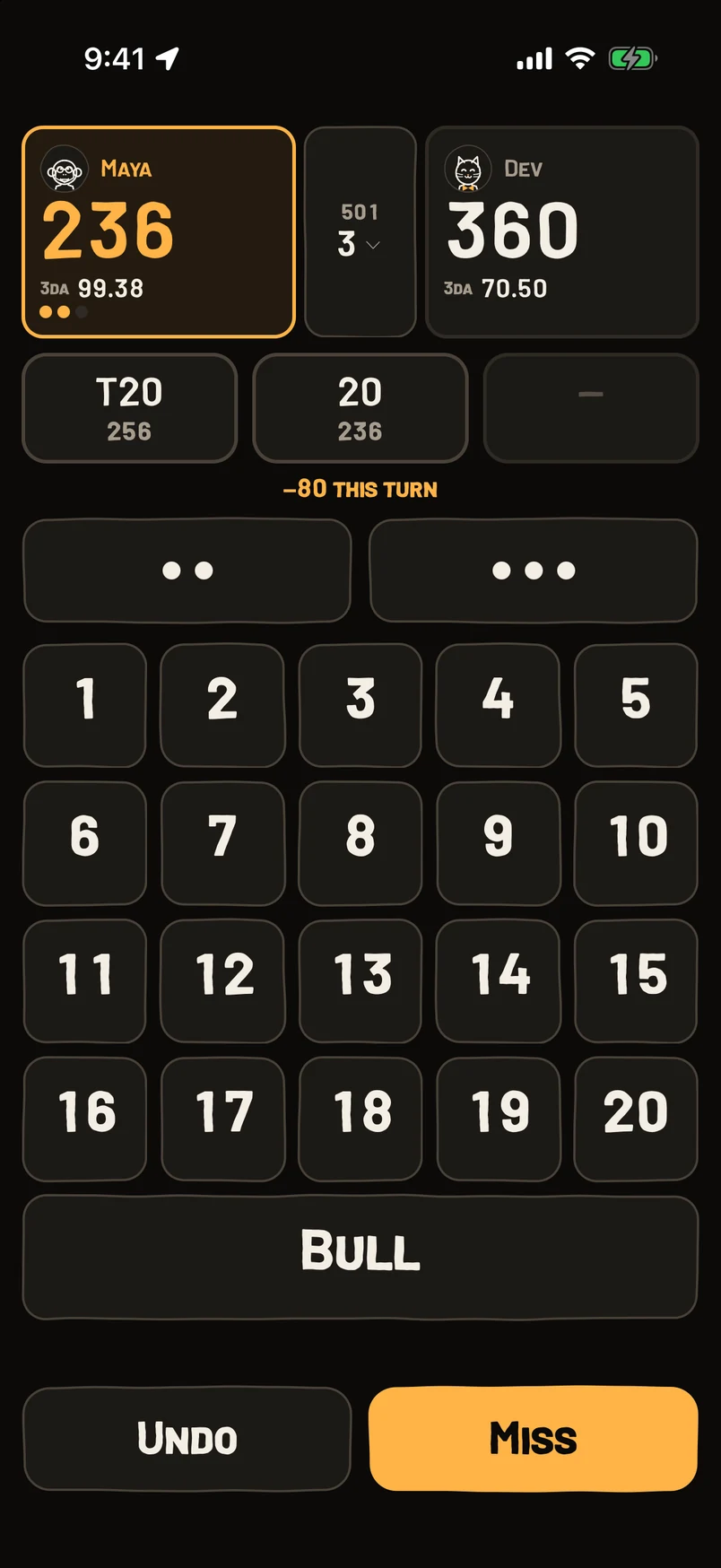
Tap the number each dart lands on. Chalky chalks the marks in Cricket, takes the score off in 301 and 501, and tells you what is left.
- STEP 4Fix A Mistake
Undo steps back one dart at a time. Miss records a dart that scored nothing.
- STEP 5Nobody To Play?
New Match › Play solo. Pick a bot from Beginner to Pro, a friend’s ghost, or The House, which is the ghost of the guy who made Chalky.
Questions
How do I score a double or a triple?
Use the two-dot key for a double and the three-dot key for a triple.
What happens on a bust?
Chalky calls the bust and puts your score back where the turn started.
Do games against a bot count on my record?
They feed your stats, but not your lifetime wins and losses.
Can I change how the buttons look?
Settings › Scoring has button labels, haptic feedback and All capitals.
How do I unlock a friend’s ghost?
A friend’s ghost unlocks once they have 10 games saved. It throws the way they have over their last 20.
Still stuck? Email brian@coasterlogic.com.